Building Applications
Business Logic
Business logic in Structr is event-driven. Code runs in response to data changes, scheduled times, user interactions, or external requests. You implement this logic in the schema – as methods on your types or as user-defined functions.
Why Event-Driven?
This architecture follows the ROCA style (Resource-Oriented Client Architecture): the server holds all business logic and state, while the client remains thin and focused on presentation. The frontend triggers events, but the logic itself lives in the schema, ensuring business rules are enforced consistently regardless of whether changes come from the UI, the REST API, or an external integration.
Building From the Data Model
Structr applications grow from the data model outward. You model your domain first, then add logic incrementally. Structr’s schema-optional graph database supports this approach: you can focus on one aspect, get it working, and add new types or relationships later without disrupting existing functionality. This makes Structr well-suited for rapid prototyping that evolves directly into production applications.
Implementing Logic
You define all business logic in the Code area of the Admin User Interface. Methods are organized by type, and user-defined functions appear in their own section. Structr provides a large library of built-in functions for common tasks like querying data, sending emails, making HTTP requests, and working with files.
Structr provides three mechanisms: lifecycle methods that react to data changes, schema methods that you call explicitly, and user-defined functions for application-wide logic.
Lifecycle Methods
To run code when data changes, you add lifecycle methods to your type. Open your type in the Code area, click the method dropdown below the method list, and select the event you want to handle.
Example: Setting Defaults on Create
{
    // onCreate lifecycle method on the Project type
    if ($.empty(this.startDate)) {
        this.startDate = new Date();
    }

    if ($.empty(this.status)) {
        this.status = 'draft';
    }

    this.projectNumber = $.Project.generateNextProjectNumber();
}
This code runs automatically whenever a new Project is created – whether through the UI, the REST API, or another script.
Available Lifecycle Methods
| Method | When it runs |
|---|---|
onCreate |
Before a new object is saved for the first time |
onSave |
Before an existing object is saved |
onDelete |
Before an object is deleted |
afterCreate |
After a new object has been committed to the database |
afterSave |
After changes to an object have been committed |
afterDelete |
After an object has been deleted from the database |
Example
The “before” methods run inside the transaction – if you throw an error, the operation is cancelled and no data is saved. The “after” methods run in a separate transaction after the data has been safely persisted, making them ideal for notifications:
{
    // afterSave lifecycle method on the Order type
    if (this.status === 'confirmed') {
        $.sendPlaintextMail(
            'orders@example.com',
            'Order System',
            this.customer.email,
            this.customer.name,
            'Order Confirmed',
            'Your order ' + this.orderNumber + ' has been confirmed.'
        );
    }
}
For a complete list of available functions like $.sendPlaintextMail(), see the Built-in Functions reference.
Other Callbacks
Certain built-in types provide additional callbacks for specific events:
| Method | Type | When it runs |
|---|---|---|
onNodeCreation |
All types | During low-level node creation |
onUpload |
File | When a file is uploaded |
onDownload |
File | When a file is downloaded |
onOAuthLogin |
User | When a user logs in via OAuth |
onStructrLogin |
User-defined function | When a user logs in via Structr authentication |
onStructrLogout |
User-defined function | When a user logs out |
onAcmeChallenge |
User-defined function | When an ACME certificate challenge is received |
afterAcmeChallenge |
User-defined function | After an ACME certificate challenge has finished |
Schema Methods
To create operations that users or external systems can trigger, you add schema methods to your types. These are custom methods that you call explicitly – via Event Action Mapping, REST, or from other code.
Instance Methods
Instance methods operate on a single object. Create one by clicking “Add method” in the Code area and giving it a name. Inside the method, use this to access the object’s data:
{
    // Instance method "calculateTotal" on the Invoice type
    let total = 0;

    for (let item of this.items) {
        total += item.quantity * item.unitPrice;
    }

    if (this.discount) {
        total = total * (1 - this.discount / 100);
    }

    return total;
}
You can then call this method on any Invoice object:
{
    let invoice = $.first($.find('Invoice', { number: '2026-001' }));
    let total = invoice.calculateTotal();
}
Static Methods
Static methods operate at the type level rather than on individual objects. Enable the “Method is static” checkbox when creating the method. Use them for operations that work with multiple objects:
{
    // Static method "findOverdue" on the Invoice type
    return $.find('Invoice', {
        status: 'unpaid',
        dueDate: $.predicate.lt(new Date())
    });
}
Service Classes
For logic that doesn’t belong to a specific data type, create a service class. A service class is a type that holds only methods – you can’t create instances of it or add properties. Use service classes to group related operations, like all methods for communicating with an external system.
To create a service class, go to the Code area and click “Create Service Class”. Service classes appear in their own branch in the tree.
{
    // Static method "generateMonthlyReport" on service class "ReportingService"
    let startDate = $.arguments.startDate;
    let endDate = $.arguments.endDate;

    let orders = $.find('Order', {
        orderDate: $.predicate.between(startDate, endDate),
        status: 'completed'
    });

    return {
        period: { start: startDate, end: endDate },
        orderCount: orders.length,
        totalRevenue: orders.reduce((sum, o) => sum + o.total, 0)
    };
}
Calling Methods on Objects
You can call methods on any Structr object, not just $.this. When you retrieve objects with $.find() or access them through relationships, they have all the methods defined on their type.
{
    // Call a method on a found object
    let invoice = $.first($.find('Invoice', { number: '2026-001' }));
    let total = invoice.calculateTotal();

    // Call methods in a loop
    for (let project of $.find('Project', { status: 'overdue' })) {
        project.sendReminder();
    }

    // Call methods through relationships
    $.this.customer.sendNotification('Your order has shipped');
}
This works because Structr objects are full objects with their schema methods attached. Any method you define on a type is available on every instance of that type, regardless of how you obtained the reference.
Calling Methods on System Types
Built-in types also come with methods. For example, Mailbox has a method to discover available folders on the mail server:
{
    let mailbox = $.first($.find('Mailbox', { name: 'Support Inbox' }));
    let folders = mailbox.getAvailableFoldersOnServer();
}
See the System Types reference for all methods available on built-in types.
Calling Methods from the Frontend
The examples above show how to call methods from within Structr code. To trigger methods from HTML pages, use Event Action Mapping. You configure a DOM event (like a button click) to call a method, and Structr handles the REST call automatically. The Event Action Mapping passes input values to the method and handles the response – displaying results, showing notifications, or triggering follow-up actions.
For details on configuring Event Action Mappings, see the Event Action Mapping chapter.
User-Defined Functions
User-defined functions provide application-wide logic that isn’t tied to a specific type. Create them in the Code area under “User-defined functions”.
Scheduled Execution
To run a function on a schedule, configure a cron expression for the function in structr.conf. Structr uses extended cron syntax that supports second-precision scheduling.
{
    // User-defined function with cron expression "0 0 2 * * *" (daily at 2 AM)

    // Syntax: dateAdd(date, years[, months[, days[, hours[, minutes[, seconds]]]]])
    let thirtyDaysAgo = $.dateAdd(new Date(), 0, 0, -30);
    let oldEntries    = $.find('LogEntry', { createdDate: $.predicate.lt(thirtyDaysAgo) });

    // delete() can take both collections and single elements
    $.delete(oldEntries);

    $.log('Deleted ' + oldEntries.length + ' old log entries');
}
Deferred Execution
To queue code for later execution without blocking the current request, use $.schedule(). This is useful for long-running operations that shouldn’t delay the response to the user.
External Events
External systems can trigger your business logic in several ways:
REST API
External systems can call your schema methods via REST, or create and modify data through Structr’s automatically generated endpoints. When data changes via REST, the same lifecycle methods execute as when changes come from the UI. For details on how to pass and access parameters when calling methods via REST, see the Method Parameters article.
Message Brokers
You can connect Structr to MQTT, Kafka, or Apache Pulsar. Incoming messages trigger lifecycle methods on specialized client types. See the Message Brokers chapter.
Structr can monitor inboxes and trigger logic when messages arrive. See the Email chapter.
Choosing the Right Mechanism
| If you need to… | Use… |
|---|---|
| Enforce rules whenever data changes | Lifecycle methods |
| Provide operations users can trigger | Schema methods |
| Run code on a schedule | User-defined functions with cron |
| Create reusable utilities | User-defined functions |
| Group related operations | Service classes |
Writing Code
You write business logic in the code editor in the Code area. When you select a method or function in the tree on the left, the editor opens on the right. The editor provides syntax highlighting and autocompletion for both JavaScript and StructrScript.
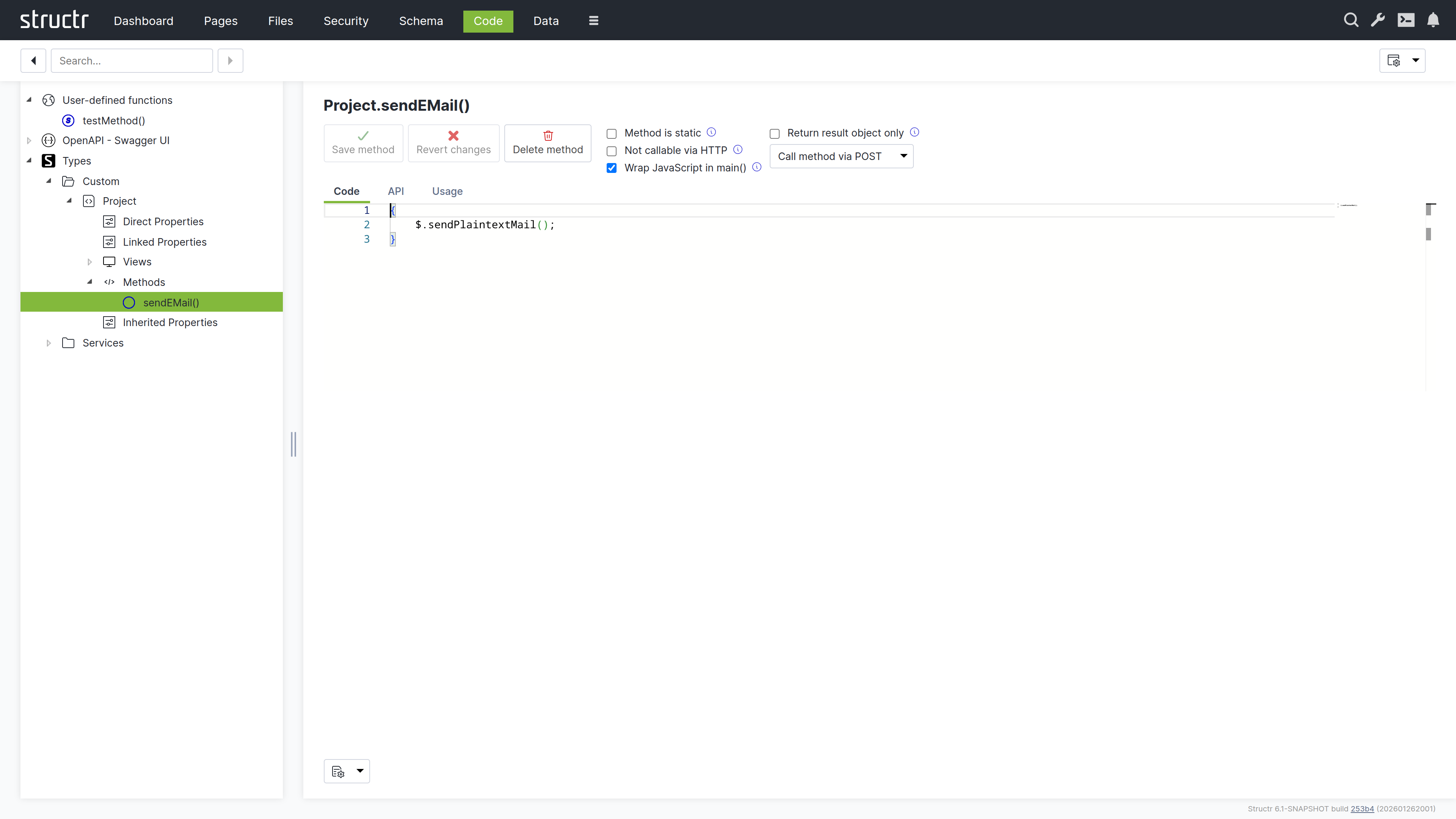
Structr supports two scripting languages: JavaScript and StructrScript. To use JavaScript, enclose your code in curly braces {…}. Code without curly braces is interpreted as StructrScript, a simpler expression language designed for template expressions.
The $ Object
In JavaScript, you access Structr’s functionality through the $ object:
{
    // Query data
    let projects = $.find('Project', { status: 'active' });

    // Create objects
    let task = $.create('Task', { name: 'New task', project: this });

    // Access the current user
    let user = $.me;

    // Call built-in functions
    $.log('Processing complete');
    $.sendPlaintextMail(...);
}
In StructrScript, you access functions directly without the $ prefix.
Calling Methods from Templates
You can call static methods from template expressions in your pages:
<span>${$.ReportingService.getActiveProjectCount()} active projects</span>
This lets you keep complex query logic in your schema methods while using the results in your templates.
Security
All code runs in the security context of the current user. Objects without read permission are invisible – they don’t appear in query results. Attempting to modify objects without write permission returns a 403 Forbidden error.
Admin Access
The admin user has full access to everything. Keep this in mind during development: if you only test as admin, permission problems won’t surface until a regular user tries the application. Test with non-admin users early.
Elevated Permissions
Sometimes you need to perform operations the current user isn’t allowed to do directly. Structr provides several functions for this.
Privileged Execution
$.doPrivileged() runs code with admin access:
{
    let projectId = this.project.id;

    $.doPrivileged(() => {
        // find() with a UUID string returns the object directly, not a collection
        let project = $.find('Project', projectId);
        project.taskCount = project.taskCount + 1;
    });
}
$.callPrivileged() calls a user-defined function with admin access:
{
    $.callPrivileged('updateStatistics', { projectId: this.project.id });
}
Executing as Another User
$.doAs() runs code as a specific user:
{
    $.doAs(targetUser, () => {
        // This code runs with targetUser's permissions
    });
}
Separate Transactions
$.doInNewTransaction() runs code in a separate transaction:
{
    $.doInNewTransaction(() => {
        // Changes here are committed independently
    });
}
Context Boundaries
These functions create a new context. You can’t use object references from the outer context directly – pass the UUID and retrieve the object inside:
{
    let id = this.id;  // Get the ID in the outer context

    $.doPrivileged(() => {
        // find() can be used to get a single object by ID
        let obj = $.find('MyType', id);  // Retrieve in inner context
        // ...
    });
}
Error Handling
When an error occurs, Structr rolls back the transaction and returns an HTTP error status – typically 422 Unprocessable Entity for validation errors.
Throwing Errors
To abort an operation with an error message:
{
    if (this.endDate < this.startDate) {
        $.error('endDate', 'invalidRange', 'End date must be after start date.');
    }
}
Or use $.assert() for simple condition checks:
{
    $.assert(this.endDate >= this.startDate, 422, 'End date must be after start date.');
}
Catching Errors
To handle errors without aborting the transaction:
{
    try {
        $.POST('https://external-api.example.com/notify', JSON.stringify(data));
    } catch (e) {
        $.log('Notification failed: ' + e.message);
    }
}
Errors During Development
In the Admin UI, scripting errors appear as pop-up notifications, making it easy to spot problems as they occur.
Development Tools
Logging
Write messages to the server log with $.log():
{
    $.log('Processing: ' + this.name);
}
Debugging
You can debug Structr’s JavaScript using Chrome DevTools. Enable the setting application.scripting.debugger in structr.conf and restart Structr. The Dashboard then shows the debugger URL in the “About Structr” section, and the URL also appears in the server log. Open the URL in Chrome to set breakpoints and step through your code.
Code Search
The Code area provides a search function to find text across all methods and functions. Structr also has a global search that spans all areas of the application.
Testing
Structr applications are best tested with integration tests that exercise the complete system. Unit testing individual methods isn’t directly supported because methods depend on the Structr runtime.
In practice, you write tests that create real objects, trigger operations, and verify results through the REST API. The tight integration between data model and business logic makes integration tests more meaningful than isolated unit tests.
Exposing Data
A significant part of business logic involves preparing data for consumers – your frontend, mobile apps, external systems, or reports.
Views
Views control which attributes appear when objects are serialized to JSON. The default public view contains only id, type, and name. You can customize it or create additional views:
GET /structr/rest/Project              → public view
GET /structr/rest/Project/summary      → summary view (custom)
GET /structr/rest/Project/all          → all attributes
Views are defined in the schema – they declare which attributes to include without any code.
Methods as API Endpoints
All schema methods are automatically exposed via REST. To call an instance method:
POST /structr/rest/Project/<uuid>/calculateTotal
To call a static method:
POST /structr/rest/Project/findOverdue
Configuring Methods
Visibility – To prevent external access, enable “Not callable via HTTP” in the method settings.
HTTP Verbs – By default, methods respond to POST. You can configure which verbs a method accepts – use GET for read-only operations.
Access Control – Resource Access Permissions let you control who can call specific endpoints. Configure them in the Security area.
Result Format – By default, results are wrapped in a metadata object. Enable “Return result object only” to return just the data – useful for external integrations.
For details on how to pass and access parameters when calling methods via REST, see the Method Parameters article.
OpenAPI
Structr automatically generates OpenAPI documentation for your endpoints at /structr/openapi. To include a type, enable “Include in OpenAPI output” and assign a tag. Types with the same tag are grouped at /structr/openapi/<tag>.json.
See the OpenAPI chapter for details.
Transforming Data
You can transform query results in JavaScript before returning them:
{
    let projects = $.find('Project', { status: 'active' });

    // Group by client
    let byClient = {};

    for (let project of projects) {
        let name = project.client.name;

        if ($.empty(byClient[name])) {
            byClient[name] = { client: name, projects: [], total: 0 };
        }

        byClient[name].projects.push({ name: project.name, budget: project.budget });
        byClient[name].total += project.budget || 0;
    }

    return Object.values(byClient);
}
Traversing the Graph
The graph database lets you follow relationships across multiple levels efficiently:
{
    // Collect all team members across all projects
    let members = new Set();

    for (let project of this.projects) {
        for (let member of project.team) {
            members.add(member);
        }
    }

    return [...members].map(m => ({ id: m.id, name: m.name, email: m.email }));
}
For complex traversals, use Cypher queries with $.cypher(). Results are automatically instantiated as Structr entities.
Building External Interfaces
When external systems need your data, create a service class that handles the transformation:
{
    // Static method on "ERPExportService"
    let projects = $.find('Project', { status: 'active' });

    return projects.map(p => ({
        externalId: p.erpId,
        title: p.name,
        customerNumber: p.client.erpCustomerNumber,
        startDate: p.startDate.toISOString().split('T')[0]
    }));
}
This keeps transformation logic in one place, making it easy to adjust when requirements change.